00

New Notification
NOTIFICATION
TEKST
TEKST
TEKST
TEKST


We are the Mic.
You are the Speaker.
In fewer metaphores...
All in Mun (Aim) is an online portal to host Model United Nations Conferences as well as academic projects regarding Global Politics, International Relations, Law etc. By the development of our online tools we allow conference hosts not only to publish MUN event information but also to use all necessary applications on a single platform. Getting interesting? Let us give you a taste!
Setup
Create the Base
193 Member States
87 Committees
Establish your desired committees containing your desired countries. Each committee can establish up to 5 topics to be the centre of the discussions.
With the Committee Selection and Country Allocation menu, you can make this happen.


Committee Selection & Country Allocation
Scrutinize your Choices
The Country Register Summary (CRS) allows you to get insight into to what extent the selected countries per committee represent the World Population regarding Geography, Population, Religion and Economy. Each variable will return a score between 0 (poor) and 100 (great). The total average of these scores will define your CRS score.


Country Register Summary (CRS)
Facility & Planning
On Point Scheduling
The incorporated Calendar tool let's you establish your own schedule for the event. What's more, you can send automated emails to each participant on (last second) changes with one button press.
Elucidate the schedule by using different colours to give a clear overview of what to expect when.
And psss.. don't forget the breaks!


Calendar
The Best Fit
Using the Applications menu, you will be able to get an extensive insight into the history and competences of your applicants. Not only will you get an insight into their basic information, you can also retrieve their past events and all member statistics (time spoken, passed resolutions, rebelvote etc.)
On top of that, submitters' motivation letter and CV will also be directly linked and accessible.

Applications

Furthermore, in the 'Preferences' tab, the preferred committee/country combinations of participants are highlighted. Using the Competition Check tool, you can find all members that applied for the same position and compare their suitability.
Afterwards, the menu allows you to assign a member to a specific position. They will be placed in a 'time wall', where the member have the opportunity to accept the assignment and pay event fee. On day before the event these delegates will gain access to the allocated tools.
You set the Rules
Permissions
You decide who is allowed to see what. Using Permissions you can add or revoke authorisation of every member within the scope of the project.
Consequently, member can gain rights (like adding events to the calendar) and workload can be better divided.

Social Event
No Overcomplification
Vending
Social Events are events with the intention to break the ice and encourage social contact between event participants.
Whether you decide to organise a party, gala or dinner, the ticket service is suitable to many event realisations. Organisers can allow event ticket sales as a package with the event or offer event tickets later in time. When a participant buys a Social Event ticket they will get a ticket right away by email.
When an applicant is present at the entry of the event, the QR code can be scanned by any device. It will have a redirect to AllinMun, where the ticket will be verified on it's validity.
It will simply return a green screen if the ticket is valid, a yellow screen if the ticket has already been scanned and a red screen if the ticket is invalid.


In Session
One Page, Unlimited Collaborators
Resolution
Using Resolution, participants can create Working Papers that can later be recognized as Draft Resolutions. In the menu, resolution-formats can be auto-generated per committee/topic by each participant.
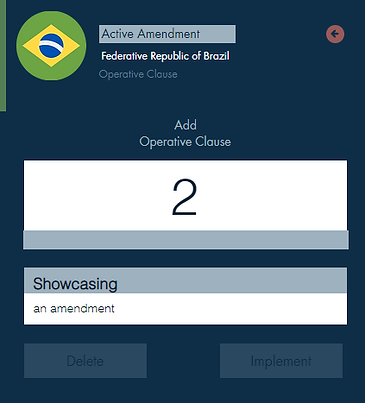
After draft-resolutions are introduced by the chairs of the committee, each participant can propose amendments. These amendments can add, change or strike any Preambulatory Clause, Operative Clause, Signatory or Sponsor.
Amendments can be implemented or rejected through a voting procedure or may be redacted by the submitter.

All in One
Session
The Session menu contains everything you need to run a successful discussion. When a session is launched, the organiser can set the discussion type, topic and time (per speaker). Next up, the session allows you to set the quorum.
Now the session is launched. In Session, you can allow participants to speak up, change the quorum, initiate a vote, or showcase a resolution.
In the voting procedure, organisers can choose between a roll-call vote or electronic vote. Electronic voting will send out a request to each member to vote using their account. Voting has multiple additional features like splitting the house and voting clause by clause.


User Tools
Online Communication
Chat
Using the Chat menu, participants can communicate online with each other to discuss their working progress. Chat functions can be disabled during sessions to prevent in-person discussions to shift online.


Open Menu